Trusted by 600+ Teams
Vendor Outage Tickets in HaloPSA
IncidentHub creates a HaloPSA ticket when a vendor outage starts - complete with outage details and a list of your MSP clients who use that vendor.
2-minute setup
No credit card required
Features
Outage Data at Your Fingertips
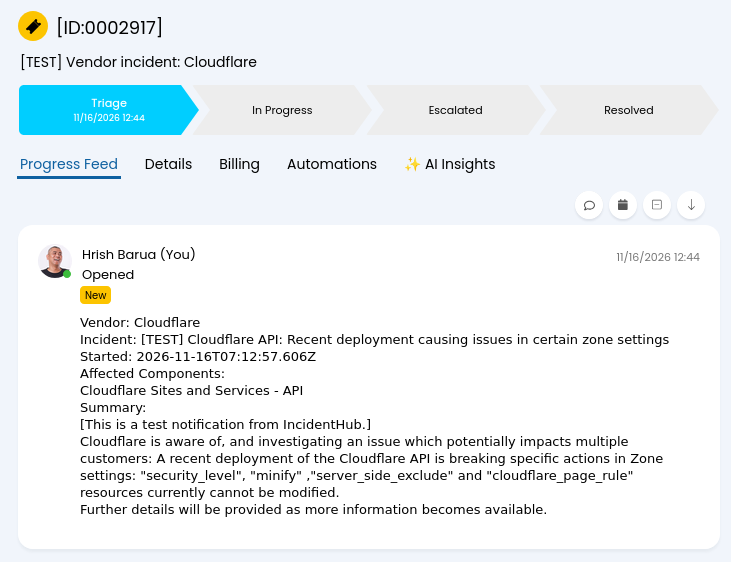
Open a HaloPSA Ticket When a Vendor Outage Starts
When a vendor your clients depend on has an outage, IncidentHub automatically opens a HaloPSA ticket.
One ticket on outage start for each monitored vendor
No extra tickets when the same incident updates or resolves
Maintenance events are not sent to HaloPSA
Easily test your HaloPSA integration with a test ticket
Client Context
See Which Clients Use the Affected Vendor
The ticket lists the clients configured in IncidentHub as using that vendor, taken from your per-client status pages. Your team can see who is affected without looking up each page.
Client names come from per-client status pages in the same account
Gives you a quick reference for which of your MSP clients are affected
Pages with no vendors selected are left off the ticket
If no page matches, the ticket is still created without a client list

Less Noise, Better Response
One Ticket for the Outage, Not One Per Client
Your team gets a single HaloPSA ticket for the vendor outage, with the affected clients named in it. You can respond to the right clients without a ticket for each one.
One ticket covers every client that uses the vendor
Client names are in the ticket, so the response is specific
Your Halo queue stays lean
Your team chooses who to contact from that list
Vendor Coverage
HaloPSA Tickets for the Vendors You Already Monitor
Tickets are created for vendors you already monitor in IncidentHub. IncidentHub covers 1125+ Cloud and SaaS services.
Cloud infrastructure: AWS, Azure, Google Cloud, and others you monitor
SaaS your clients use, including Microsoft 365 and Google Workspace
Component filters for all vendors apply to all your tickets seamlessly